

Lesson 1 of 0
In Progress
Session 2: Fun With Paint
Hello Learners, welcome to today’s session. In the previous session, we learned how to add the backdrop, and sprite and code them. In this session, we will learn to create our own sprite with the help of the paint editor in the ‘PictoBlox’ software.
Paint Editor
Paint Editor is a built-in image editor you can use to create and modify sprites, costumes, and backdrops.

Tools in Paint Editor
They are various tools in the paint editor, let us learn some of the tools which we will be using in this session.
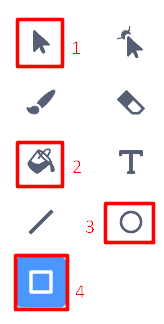
- Select – It is used to stretch, shrink, rotate, or change the location of an object.
- Fill – It is used to fill the objects with the color specified in the Fill menu.
- Circle – It is used to draw circles and ovals.
- Rectangle – It is used to draw rectangles and squares.
Ready for some action? Let us use the above paint tools and start creating our own sprite and backdrop.